2.1.1.3. Running Plausibility
To run the plausibility, you can use the following launch command in your terminal:
roslaunch camera_perception plausibility.launch
2.1.1.3.1. Available Arguments
You can set the following arguments:
send_debug_informations(yes/no):Description: If set to yes the node will output debug informations to
/rosout.Default: yes
generate_detection_image(yes/no):Description: Generates an annotated image and publishes it to
/perception/detection_image.Default: yes
record_rosbag(yes/no):Description: Records a rosbag with the topics
/perception/detection_image,/perception/bounding_boxes, and/perception/old_bounding_boxes.Default: no
display_image(yes/no):Description: Display the annotated image locally. You may need to configure your
DISPLAYenvironment variable for this to work properly.Default: no
use_zed(yes/no):Description: Use the ZED camera instead of the images from the supplied rosbag.
Default: no
input_rosbag(String):Description: Path to the rosbag to use.
Default: None
Note that the default values will be used if you do not specify the arguments.
2.1.1.3.2. Detection image
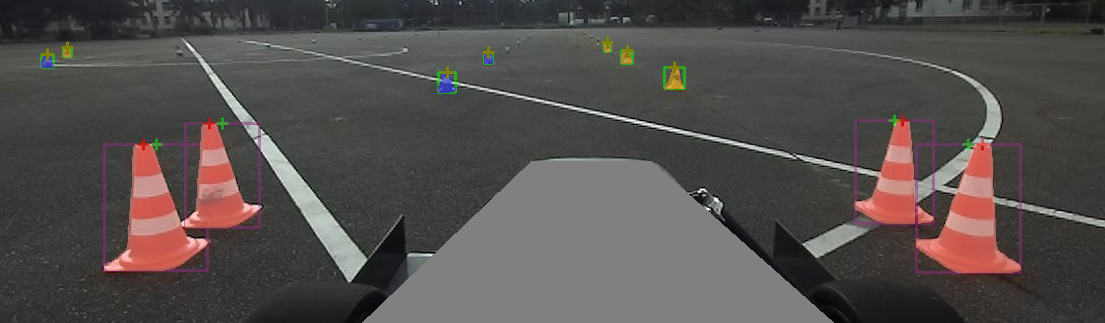
Fig. 2.1 Legend: - Red Cross: Highest point of mask - Green Cross: Middle of bounding box - Orange Cross: Highest point of mask and middle of bounding box are overlapping - Green Bounding Box: Object did not qualify for mask processing (min. bounding box height) - Other Colors: Object qualified for mask processing